
Divi Builder Modules and Layouts Complete Guide for WordPress Sites
Divi modules are individual building blocks you drag onto pages to add content and functionality. Buttons, forms, galleries, pricing tables, video embeds – all with no code.
Every module sits inside a column. Columns sit inside rows. Rows sit inside sections. This four-level hierarchy gives you precise layout control while keeping the visual builder manageable.
Divi ships with 40+ native modules and 20+ WooCommerce modules. For most business sites, these handle the job. When you need specialized functionality like interactive effects or other complex features, third-party module plugins fill the gaps.
Divi includes basic pre-made layouts if you’d rather not start from a blank page. For anyone looking to the future, all native Divi modules and all Divi Life products work with Divi 5.
Let’s go over which modules work best for landing pages, portfolios, service sites, blogs, and online stores.
Understanding native Divi modules and when to extend them
✋ Divi Theme comes with the builder pre-installed. The standalone Divi Builder plugin works with any WordPress theme, but may have compatibility issues that Elegant Themes can’t control. The rest of this article assumes you’re using the Divi Theme.
Native Divi’s modules cover standard website needs:
- Content display includes text, images, galleries, video, and audio.
- Conversion tools include buttons, CTAs, email optins, and contact forms.
- Layout organization includes accordions, tabs, toggles, and sidebars.
- Full-width elements cover headers, sliders, heroes, and portfolio displays.
For straightforward business sites, blogs, and simple portfolios, native modules handle the job.
You’ll hit their limits when you need:
- Interactive effects like hover reveals and flip animations.
- Visual comparisons like before/after sliders.
- Advanced gallery layouts like masonry.
- Specialized displays like timelines and restaurant menus.
Building these without additional modules means custom code or complex workarounds.
Divi Modules Pro adds 13 specialized modules that address these gaps:
- Interactive modules include Flip Box, Hover Box, Before & After Slider, and Image Hotspot.
- Advanced display modules include Carousel, Masonry Gallery, and Timeline. The Carousel pulls directly from your Divi Library for easy content management.
- Conversion modules include Countdown Timer, Popup, and Multi Button.
- Utility modules include Breadcrumbs, Restaurant Menu, and Content Toggle.
These go far beyond improving on the native options. A module like Restaurant Menu fundamentally reshapes your workflow.

The performance architecture makes a difference here. Dynamic asset loading means CSS and JS only load for modules actually used on each page. Disabled modules contribute zero code anywhere on your site.
Start with native Divi. Add specialized modules when you need functionality that would otherwise require custom development.
The All Access Pass bundles Divi Modules Pro with 20+ plugins, 35+ child themes, 1,000+ layouts, and 10+ eCommerce products.
Building different website types with Divi modules
Module selection depends on what you’re building. A landing page needs a different structure than a portfolio site. Service businesses prioritize trust signals. Blogs prioritize readability. Online stores prioritize product discovery and checkout flow.
Consider these starting frameworks you can adapt based on your specific project requirements and client needs.
Landing pages that convert visitors to customers
The most useful Divi modules for business landing pages follow a psychological flow: Hero, Text, Blurb, then CTA.
The Fullwidth Header module creates the first impression. Background image or video, headline, subhead, and primary call-to-action above the fold. This commands attention and establishes relevance immediately.
The Text module delivers your value proposition. Keep it scannable. Short paragraphs, clear benefit statements.
Blurb modules break down features or benefits with icons. The visual hierarchy helps visitors process information quickly without reading every word. Use four to six blurbs depending on your offer complexity.
The Button or Call To Action module drives the conversion. Clear copy, single action, minimal friction.
This combination works because it guides the eye from broad appeal to specific action. The hero captures attention, text and blurbs build credibility, and the CTA tells visitors exactly what to do next.
Divi Modules Pro extends this framework:
- Before/After Slider shows transformation results visually.
- Popup captures exit intent or triggers on scroll depth and time delay.
- Countdown Timer creates urgency for limited-time offers.

Configure responsive settings for every module. Most landing page traffic comes from mobile.
Check out the demos on the Divi Modules Pro website to see all these modules in action.
Portfolio sites that showcase creative work
Portfolio sites prioritize visuals over text. The module strategy reflects this: Portfolio, Gallery, Text, Image.
The Fullwidth Portfolio module displays work in grid format with category filtering. Visitors can browse by project type without navigating away from the page. Set it to full-width for maximum visual impact on first load.
The Gallery module groups related projects with built-in lightbox functionality. This allows deeper exploration of individual pieces without overwhelming the main portfolio view.
The Text module provides project context. Process notes, client testimonials, technical details, project outcomes. Keep text blocks short. Let the work speak first.
The Image module highlights specific details within case studies. Close-up shots, process documentation, and final deliverables in context.
This combination works because creative audiences evaluate work visually before reading about it. The full-width portfolio creates an immediate impression. The gallery invites exploration. Text supports but never dominates the visual narrative.
Divi Modules Pro adds functionality that native modules lack:
- Masonry Gallery creates dynamic, space-efficient displays that accommodate different image aspect ratios.
- Hover Box reveals project details, client names, or links on interaction without cluttering the initial view.
- Image Hotspot highlights specific features within portfolio pieces. It’s useful for UX case studies, architectural photography, or product design work.

For motion designers and video editors, consider video backgrounds in hero sections. Show the work in motion before visitors scroll.
Divi Life’s portfolio-focused child themes and layout packs give creative professionals a polished starting point built specifically for visual presentation.
Service business sites that build trust and generate leads
Service businesses need modules that build credibility and remove barriers to contact. The module strategy: Contact Form, Testimonial, Person, Pricing Table.
The Contact Form module belongs above the fold or immediately after your value proposition. Prominent placement reduces friction. Visitors shouldn’t scroll to find how to reach you.
The Testimonial module provides social proof. Client quotes with names, photos, and company details transfer trust from existing customers to prospects. Place testimonials near your contact form and pricing information where objections typically arise.
The Person module introduces the team behind the service. Faces humanize businesses. Professional headshots with brief bios establish expertise and make prospects feel like they know who they’ll work with.
The Pricing Table module removes the “what does this cost” barrier. Transparent pricing eliminates a major source of friction. Even if you offer custom quotes, displaying starting prices or package tiers helps qualify leads before they contact you.
This combination systematically addresses common objections. Easy contact removes friction. Testimonials transfer trust. Team photos build familiarity. Visible pricing eliminates uncertainty.
Use the Sidebar module on service detail pages. Categories, related services, downloadable resources, and secondary calls-to-action stay visible as visitors scroll through page content.
Divi Modules Pro extends this framework:
- Image Hotspot explains service packages or process steps visually.
- Timeline displays company history or project methodology chronologically.
- Multi Button presents multiple service tiers or contact options side-by-side without forcing visitors to choose prematurely.

Blog and content sites optimized for readability
Content sites balance two competing needs: helping visitors discover articles and keeping them focused once they start reading. The module strategy is Blog module, post content modules, Sidebar.
The Blog module displays posts in grid or list format on index pages. Featured images, excerpts, and metadata help visitors scan for relevant content. Configure the number of posts, column layout, and pagination based on your publishing volume.
Post content uses Text, Image, Gallery, and Video modules within individual articles. Keep the layout clear. Wide content areas with generous line height improve readability. Limit distractions within the reading experience.
The Sidebar module houses navigation elements: categories, recent posts, search, email signup, and related resources. On desktop, sidebars provide persistent navigation without interrupting the reading flow. On mobile, sidebars typically collapse below content. Consider whether your mobile readers need sidebar access or whether in-content links serve them better.
This structure works because it separates discovery from reading. The blog module helps visitors find what they want. The post layout keeps them focused. The sidebar provides options without demanding attention.
Divi Modules Pro adds useful functionality for publishers:
- Breadcrumbs improve navigation on sites with deep category structures.
- Content Toggle creates FAQ sections or expandable resource lists without overwhelming the page.
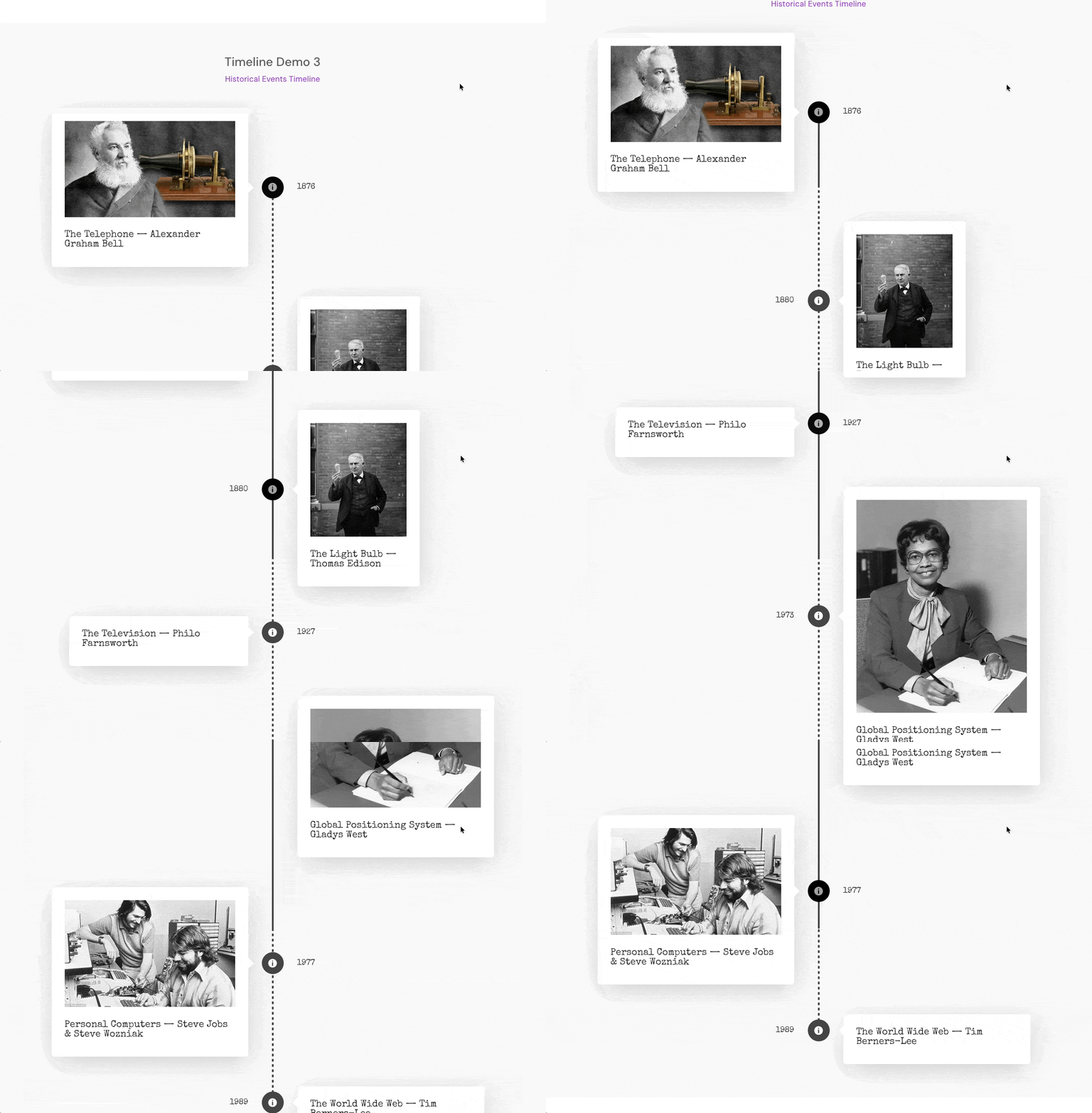
- Timeline organizes article series or chronological content like company histories and event coverage.
Configure post meta display settings thoughtfully. Author, date, and categories help readers assess relevance. Reading time estimates set expectations.
For detailed implementation steps, check out our guide on how to build a custom blog page with Divi.
eCommerce pages that drive product sales
Divi includes basic WooCommerce modules for online stores. Product grids, single product displays, cart, and checkout pages work out of the box.
The Pricing Table module handles service packages and subscription tiers where you need feature comparisons rather than traditional product listings.
Native WooCommerce modules cover fundamentals but have limitations. No advanced filtering. No quick view. Limited customization for product layouts and shop pages. For simple stores with few products, native modules work fine. For larger catalogs or custom shopping experiences, you’ll hit walls.
Divi WooCommerce Pro addresses these gaps. Product carousels, advanced filtering, custom shop layouts, and specialized single product templates.
Check it out in action, with the custom dynamic product fields for materials and other highlights:

It’s a separate product designed specifically for online stores and included in the All Access Pass alongside other Divi Life products.
Divi Modules Pro complements eCommerce sites even though it’s not store-specific:
- Countdown Timer adds urgency to flash sales and limited-time offers.
- Carousel showcases featured products, new arrivals, or related items.
- Before & After Slider works well for transformation products in fitness, beauty, home improvement, and similar niches where visual results matter.

For serious WooCommerce builds, combining native modules with Divi WooCommerce Pro and selective Divi Modules Pro elements gives you flexibility without overloading your site with unused features.
Building pages efficiently with pre-made layouts
Pre-made layouts implement the module strategies covered above. Best practices for placement and styling are already built in. You swap colors, fonts, images, and copy rather than constructing page structure from scratch.
To use a pre-made layout instead of starting blank: open the Visual Builder, click the plus icon to add a section, and select Choose A Premade Layout from the Divi Library. Load the layout directly onto your page and customize using standard module controls.
Elegant Themes includes free layout packs in the Divi Library. These work as starting points for users on tighter budgets. Blog layouts, basic business pages, and simple landing pages are available at no extra cost.
Divi Life’s Divi Layouts go further:
- Landing page layouts like SaaS Landing, Business Landing, Catering Landing, and Fitness Landing are designed specifically for conversion.
- Portfolio layouts emphasize visual presentation.
- Service business layouts position trust elements strategically.
Each layout reflects the module combinations and placement principles that actually drive results.
Once again, the All Access Pass includes access to all 1,000+ Divi Life layouts.
For site-wide headers and footers, use the Divi Theme Builder. Access it through Divi > Theme Builder in your WordPress dashboard. Create a header template once, and it applies across your entire site automatically. Same for footers. Consistent contact information, navigation, and branding without manually editing every page.
The Divi Headers Layout Pack provides professional header designs as starting points. Navigation structures, logo placement, CTA buttons, and mobile menu configurations are already handled.

Customize through the same visual controls you use for page modules with zero code.
Start building with Divi’s modules and layouts today
Matching modules to page type creates better results than adding features at random. Landing pages need hero sections and clear CTAs. Portfolios need visual-first displays. Service sites need trust builders. Blogs need readable layouts with smart navigation.
Divi modules cover most scenarios when you’re starting out. Add Divi Modules Pro when you need interactive effects, advanced galleries, countdown timers, popups, or specialized displays that native modules don’t offer. Use Divi Life layouts to skip structural decisions and focus on content.
All native Divi modules and all Divi Life products are confirmed Divi 5 compatible.
The All Access Pass bundles Divi Modules Pro with layouts, child themes, and specialized plugins for unlimited sites.
Pick the page type that matches your current project and start there.
Get started with Divi Modules Pro today to elevate your website!


0 Comments