
Divi Multilingual Website Setup Without Coding

Divi divides content across multiple database layers that most translation plugins do not automatically detect. Headers, footers, and global modules often remain untranslated because they exist outside the standard post structure that translation plugins expect.
Join us as we explain how Divi’s architecture affects translation and how to configure each tool correctly. We’ll outline which content areas require manual setup, how to ensure all elements register for translation, and how to optimize performance. Our goal is to help you translate Divi sites systematically without editing code.
Understand how Divi manages your content
Unlike standard WordPress themes that store all content in one predictable location, Divi distributes it across several database layers. Each layer behaves differently when scanned by translation plugins, which explains why certain elements fail to appear in translation interfaces.
You need to understand these layers before attempting any multilingual setup.
Why Divi fragments your content
Divi separates content into three main areas: pages, Theme Builder templates, and module settings.
Translation plugins expect all text in standard WordPress tables, but Divi stores layouts as serialized arrays containing shortcodes such as
Each major Divi update can alter how this data is stored, occasionally breaking existing translations.
Standard page and post content
This is the only area that behaves like traditional WordPress content.
Text entered into Divi modules on a specific page resides in the wp_posts table, where translation plugins operate effectively. This content typically translates without issue because it follows WordPress’s native structure.
However, it represents only part of what users see on a Divi site. Elements such as your popups, headers, and footers belong to separate layers that must be translated independently.
Theme builder templates and global elements
Divi’s Theme Builder saves headers, footers, and other templates as custom post types named et_theme_builder.
Each template has its own ID and conditional logic determining where it appears. Because these are not tied directly to pages, they do not show in String Translation. Instead, they are managed under Translation Management, usually under Header Layout or similar labels.
Global modules saved in the Divi Library are stored as et_pb_layout posts and require independent translation, even when reused across multiple pages.
Module settings and theme options
Text within module settings, button labels, and theme options exists in WordPress’s options tables rather than in post data.
Some of these strings register automatically in translation interfaces, while others need manual registration through XML files. The difference depends on how the module’s developer implemented WordPress internationalization functions.
Modules that skip proper registration leave untranslated text that cannot be found through standard scanning.
The third-party plugin multiplication effect
Adding plugins like Divi Overlays, Mega Pro, or Divi Bars introduces new custom post types. Each creates its own content silo – divi_overlay, divi_mega_menu, or divi_bars – that must be manually enabled for translation in WPML or similar tools.
These plugins follow Divi’s architecture, so their content behaves like Theme Builder templates rather than regular posts. “Translation-ready” simply means the developer used translation functions, not that the plugin integrates automatically with your translation workflow.
Choose your translation plugin
Divi works with multiple translation tools, but each handles its data layers differently.
The right plugin depends on how much control you need, the scale of your projects, and how comfortable you are managing database structures.
WPML: The database architect’s choice
WPML duplicates every piece of content in the database, creating separate post IDs for each language and linking them through relationship tables.

Source: WPML
This approach gives precise control over every string and integrates with professional translation services. It’s ideal for complex multilingual workflows but requires knowledge of Divi’s structure to locate all translatable elements.
Custom modules may also need manual XML configuration to register their strings. WPML’s Multilingual CMS and String Translation packages are priced separately, and costs vary by feature level.
Best for: Agencies, large sites, or projects requiring structured translation management and fine-grained control.
TranslatePress: The visual editor’s solution
TranslatePress translates content directly on the frontend. You click visible text and edit it in place, bypassing Divi’s internal storage layers.

Source: TranslatePress
This makes setup faster and removes the need to identify post types or string domains.
However, it lacks advanced workflow features such as shared translation memory and can struggle with dynamic JavaScript content. Pricing depends on the chosen plan, with a free version available.
Best for: Small businesses or solo developers who need quick results without database configuration.
Polylang: The middle ground
Polylang creates independent posts for each language, similar to WPML, but uses a lighter system that is easier to manage.

Source: Polylang
It supports professional features through add-ons while remaining more affordable. Divi templates require manual synchronization because Polylang lacks built-in Divi-specific guidance. Users must verify that Theme Builder layouts and library items are properly linked across languages.
Polylang Pro offers additional features, while the free version covers most essentials.
Best for: Projects where cost and simplicity matter but structured translation management is still required.
How to set up WPML with Divi
WPML remains the most widely used translation plugin for Divi because it offers full control over every content type and integrates directly with professional translation workflows.
However, Divi’s layered architecture means WPML will not automatically detect all layouts or modules without proper configuration.
Here’s how to align WPML with Divi’s structure so every header, footer, and global module translates correctly:
- Set your default language in WordPress and, under Settings > Permalinks, choose a straightforward permalink structure like /%postname%/.
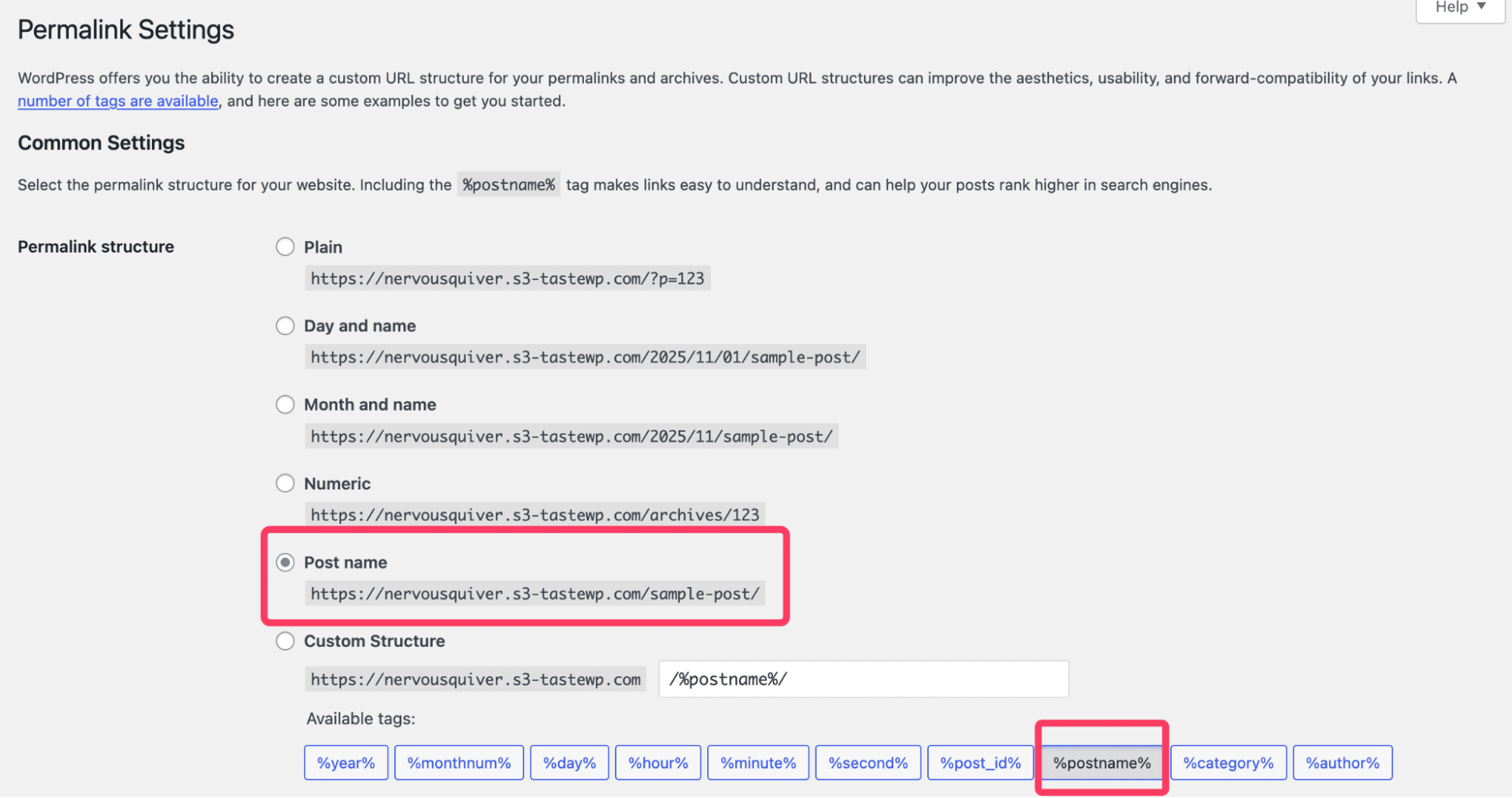
- Use subdirectories like domain.com/es/ for translations to maintain SEO, and reserve subdomains for region-specific sites.
- In WPML > Settings > Post Types Translation, enable et_pb_layout (Divi Library items) and et_theme_builder (headers and footers).
- Enable any extra post types created by Divi extensions such as divi_overlay, divi_mega_menu, or divi_bars.
- Open Translation Management and confirm that all templates, global modules, and third-party content appear as translatable.
- If a string is missing, slightly edit the original text, save, and rescan in String Translation, or register it manually via XML.
- If templates or text remain untranslated, clear caches, regenerate CSS under Divi > Theme Options, and verify that each content type is marked as translatable.
- Resend affected items for translation and confirm that translated headers, footers, and modules display correctly across all languages.

The Divi translation workflow
Divi sites translate best when handled in a defined sequence. Working in order prevents duplication errors and ensures that shared layouts are translated before dependent content.
Phase 1: Theme builder templates
Translate Theme Builder templates before individual pages. These layouts – headers, footers, and other global structures – appear across multiple pages, so one translation applies site-wide.
In WPML, open Translation Management, filter by each template type, and send them for translation. In TranslatePress, open a page that uses the template and translate header or footer text directly.
After translation, test conditional rules to confirm that templates assigned to “All Pages” display correctly in every language version.
Phase 2: Critical landing pages
Next, translate key pages such as the homepage, main services, and contact page. These establish the base translation pattern and reveal any layout or performance issues early.
Confirm that both the page content and attached templates display in the target language. Record untranslated strings for follow-up in the string translation phase. A simple tracking sheet should be enough to avoid duplicate work and ensure consistent completion across large projects.
Phase 3: Module strings and hidden text
Use your translation plugin’s string tools to locate text that remains untranslated after page and template work. This often includes form labels, button text in global modules, or dynamic elements like countdown timers.
If a string refuses to appear, edit the source text slightly and resave to force registration. Check Theme Customizer items separately – footer credits and taglines often live there rather than in post data.
Build your multilingual UI with Divi Life
Divi Life extensions expand Divi’s frontend design possibilities, but each one adds its own content types that must be included in your translation workflow. Handling these properly ensures that popups, menus, and announcements display in the correct language without cross-language conflicts or duplicate triggers.
Divi Overlays: Managing multilingual popups
Divi Overlays stores popups as a custom post type named divi_overlay, which must be enabled in your translation plugin’s settings.
You can create separate popups per language or use a single popup containing translated content. For WPML, enable divi_overlay under Post Types Translation before assigning translations. Use URL parameters to set language-specific triggers so popups appear only for the correct audience.
To prevent overlapping behavior, add language-specific CSS classes such as lang-es or lang-fr in the popup settings. This keeps popups organized and ensures that each translation triggers independently.
Divi Mega Pro: Language-aware navigation
Divi Mega Pro builds navigation layouts as complete Divi templates, allowing menus with text, images, or forms tailored per language.
Each mega menu functions as its own layout file, so translate them individually.
In WordPress, open Appearance > Menus and assign the correct translated mega menu to each language’s menu item. WPML’s synchronization can handle shared menu structures, but you can disable it when markets require fully different navigation setups.
This separation allows precise control over how each language version guides users through the site.
Supporting products for multilingual sites
Divi Bars, Divi Mobile Menu, and other Divi Life tools create extra content zones that need manual translation setup.
Divi Bars is useful for country- or language-specific announcements such as localized promotions or shipping notices. Divi Mobile Menu lets you build different mobile experiences when navigation requirements vary between regions.
Each plugin registers its own post type, so enable these within your translation settings and confirm that their layouts appear in Translation Management.
Troubleshooting, optimization, and testing
Even with proper setup, Divi multilingual sites can develop issues related to layout duplication, missing strings, or performance overhead. These are predictable and preventable once you understand their causes.
Duplicate ID issues
Duplicating Divi layouts between languages can reuse identical CSS IDs and classes. When this happens, JavaScript events target every instance at once, causing all popups, accordions, or animations to trigger globally.
To avoid this, adopt a clear naming convention such as en-header-cta and es-header-cta for language-specific IDs. When possible, duplicate layouts using your translation plugin’s built-in duplication tool instead of copying manually.
These tools automatically handle unique ID generation and prevent cross-language conflicts that disrupt interactivity.
Missing or broken string translations
Untranslated or inconsistent strings usually result from unregistered module text, cached pages, or corrupted translation memory.
Check if the string exists in String Translation and confirm it is assigned to the correct text domain. If it appears but remains untranslated, clear all caches, regenerate CSS in Divi > Theme Options, and rescan for new strings.
As a last resort, manually register missing strings in your translation files or apply quick text replacements using a plugin like Say What? to maintain continuity.
Optimizing for performance
Multilingual setups increase database size and load times, but Divi and WPML include tools to reduce the impact.
Disable unused WPML modules such as Classic Translation Editor or Media Translation if unnecessary. In Divi > Theme Options > Performance, enable Dynamic CSS, Dynamic Module Framework, and Critical CSS.
Complete all translations before activating full-page caching to prevent mixed-language pages from being cached. At the server level, upgrade to the latest version of PHP, enable OpCache, and use WP-Optimize to clean translation revisions and compress database tables.
Master Divi’s multilingual architecture
Divi distributes content across multiple layers that must be translated individually. Understanding how these layers connect is the foundation of a reliable multilingual workflow. Success depends on translating each content type – Theme Builder templates, page layouts, and module strings – using a structured process rather than random trial and error.
Each translation plugin serves a different approach. WPML offers granular database control, TranslatePress provides quick visual editing, and Polylang balances flexibility with simplicity. The right choice depends on your technical comfort and project size, but all require awareness of how Divi stores content.
Audit your existing site to identify every custom post type, confirm that each one is enabled for translation, and follow the same workflow consistently. Once your structure is aligned, you can extend functionality with Divi Overlays for localized popups and Divi Mega Pro for language-specific navigation.
Now that you’ve understood the foundation for a multilingual Divi site, it’s time to give your clients a world-class experience. With the Divi Life All Access Pass, you’ll have everything you need to customize content by language, region, or audience – including multilingual popups, navigation, and targeted promotions.


0 Comments