
Divi Popup Plugin Review – Comparing Top 5 Options for WordPress Sites

Divi doesn’t offer a full-fledged popup builder, relying instead on basic features. For professional websites, popups power lead generation, announcements, and user engagement, so most of them turn to third-party plugins to bridge this gap.
We’ve created this guide on how popups work within Divi and compared the best plugin options, focusing on reliability, ease of use, and compatibility with Divi’s Visual Builder. If you’re looking for a solution that integrates smoothly with Divi without complicating your layout, here’s everything you need.
What Divi popups do
Popups deliver targeted messages without disrupting the user’s navigation.
They’re used for various purposes: generating leads, capturing email sign-ups through newsletter popups, recovering abandoned carts with exit-intent offers, or keeping users engaged with video popups. Contact forms within popups typically convert better than on dedicated pages, offering a less intrusive experience.
Popups provide a valuable tool for increasing engagement without forcing users to leave the current page.
Choosing between popups, overlays, and modals
Popups, overlays, and modals each serve distinct technical purposes, and understanding the difference is crucial when choosing the right solution.
- Popups are small windows that display brief, targeted messages without requiring users to leave the current page. They’re great for quick notifications or calls to action, like newsletter sign-ups.
- Overlays cover the entire screen with a semi-transparent background, drawing attention to a specific message or action, such as promotional offers or special announcements. They provide a more immersive experience without fully interrupting the user flow.
Modals lock the user’s interaction until dismissed, typically used for age gates, warnings, or important notices that must be addressed before continuing.
What to look for when choosing your Divi popup plugin
When selecting a Divi popup plugin, consider integration, trigger options, accessibility, and performance. Look for a plugin that integrates smoothly with Divi’s Visual Builder, offers customizable trigger methods, ensures good keyboard navigation, and doesn’t negatively impact site performance.
The builder integration approach
Quality Divi popup plugins use WordPress Custom Post Types (CPTs) to manage popups, allowing you to design them directly within the Divi Builder interface. This ensures a consistent, intuitive workflow since any Divi module – such as forms or videos – can be used inside the popup.
Importantly, popups are managed separately from regular pages in your WordPress admin, keeping things organized and easy to maintain.
Range of trigger methods
The best Divi popup plugins provide a variety of trigger methods:
- Click triggers attach popups to buttons, links, or images using a unique CSS ID.
- Page load delays let you customize the delay time, with common settings between 3 and 30 seconds.
- Scroll percentage triggers activate popups at specific scroll depths (25%, 50%, or 75%).
- Exit intent detects mouse movement toward browser controls (desktop-only).
On mobile, exit intent doesn’t work, so timed delays are used instead.
Accessibility and keyboard navigation
Popups must be fully accessible, especially for users relying on keyboard navigation.
Focus escaping modals can break navigation, so the tab key should stay within the popup until it’s closed. Quality plugins include ESC key functionality for closing, and a click-to-close option provides a larger target for users with motor impairments.
Ensure the plugin adheres to WCAG guidelines with proper focus management and keyboard controls.
Performance impact and caching functionality
Popups should be optimized for performance.
Look for plugins that use AJAX loading to ensure popup content doesn’t slow down the initial page load. Cookie-based frequency control is also important, as it ensures popups only appear once per session, reducing the risk of annoying repeat displays.
Comparing the main tools for creating popups in Divi
Here’s a straight comparison of the top Divi‑compatible popup plugins, evaluated for reliability, compatibility, and professional site requirements.
We’ve focused on how well each one handles triggers, integrates with Divi, preserves layout under caching, and avoids technical issues.
Divi Overlays
Divi Overlays integrates directly with the Divi Builder, providing a familiar experience for creating popups and overlays without needing to switch to a separate interface. You can design your popups just like any other Divi page, using the drag-and-drop Visual Builder.
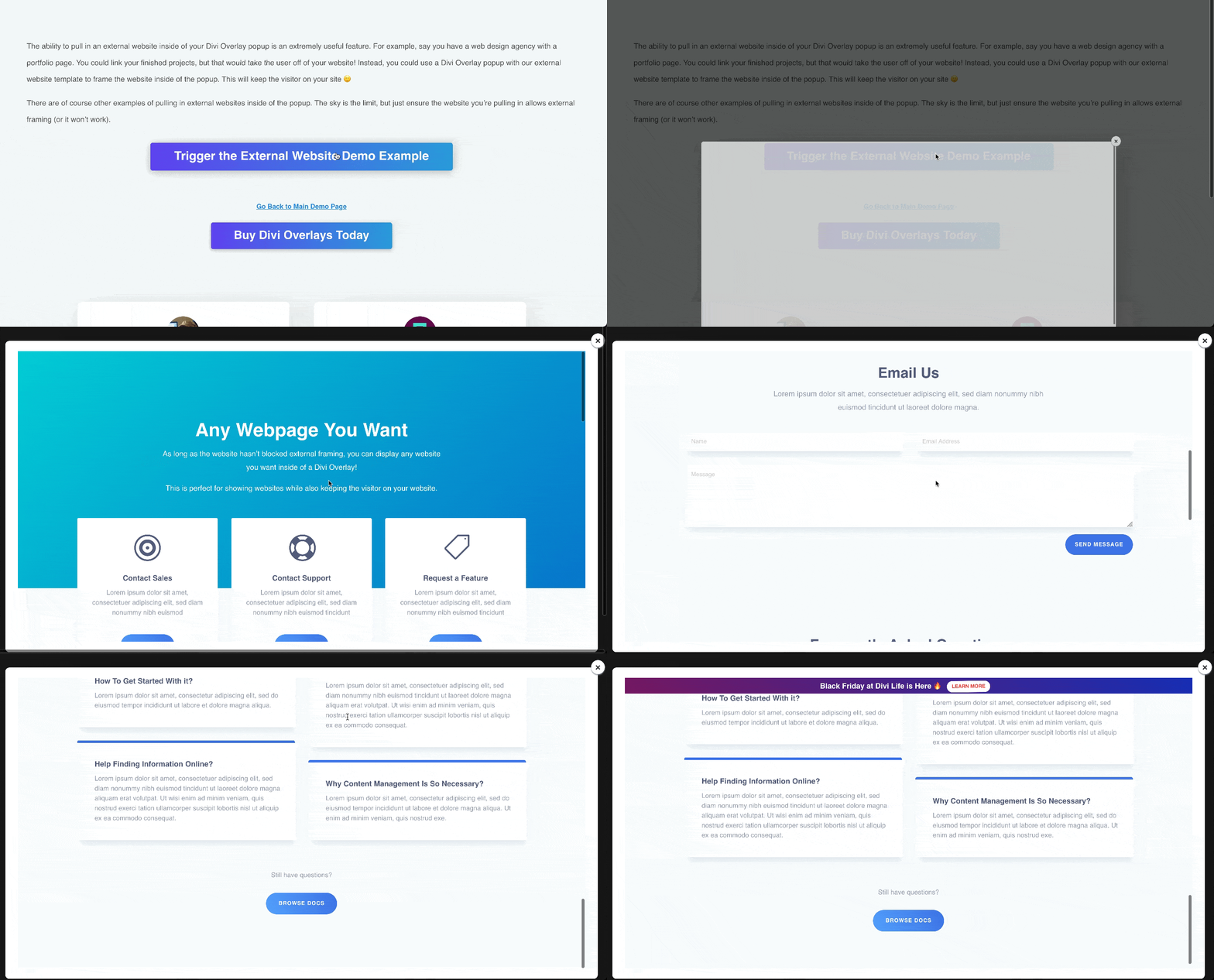
Here’s a Divi Overlays popup that displays an external website.
Its cookie-based frequency control prevents popups from appearing repeatedly to the same user within a defined period. It also offers a variety of trigger options, including click triggers, timed delays, scroll percentages, and exit-intent for desktop users.
Divi Overlays is Divi 5 compatible and supports URL-based targeting, which allows you to display popups based on specific pages or user actions. The plugin’s lightweight nature helps it work well with caching systems, so you don’t need to worry about popups breaking when your site’s cache is enabled.
Best for users looking for a Divi-native solution with strong trigger options and ease of use, Divi Overlays excels in providing a reliable popup experience.
Interactions by Elegant Themes
Interactions is Divi’s built-in tool for creating basic popups, and it’s a good option for users who need simple functionality.
You can easily design popups using Divi’s Visual Builder, and it works within the Divi ecosystem, making it straightforward to integrate with your existing pages. Basic triggers like page load or timed delays are available, which can be sufficient for simple calls to action or announcements.
However, while it’s easy to use for basic popups, the functionality is quite limited. For example, it lacks more advanced triggers like scroll percentages, which many professional sites require. You also miss out on more granular control over frequency and targeting, which can affect user experience, especially for sites with high traffic or complex needs.
Interactions is a solid choice for users needing simple popups and easy integration with Divi. However, if you need more advanced features or customization options, a dedicated plugin may be a better solution.
Best for users who want basic popups and prefer to stick within the Divi ecosystem without additional plugins.
Popups for Divi
Popups for Divi is a free, Divi‑compatible plugin that lets you build popups using the native Divi Builder, with no additional cost.
You can turn any Divi Section into a popup by enabling the “This is a Popup” flag and assigning a unique ID, then trigger it with a link or button elsewhere on the page.

Source: Divimode
The plugin supports basic triggers like click (via link/button), and timed delays. Since it’s free and integrates directly with Divi’s interface and default modules, it’s ideal for simple needs such as a newsletter sign‑up or a basic announcement.
Best for users who need a free, simple click- or delay‑triggered popup with basic functionality, ideally small websites or quick announcements where advanced targeting and frequency control aren’t needed.
Popup Maker
Popup Maker is a popular WordPress plugin used by over 700,000 websites, offering a wide range of popup features.

Source: Popup Maker
However, it’s not built specifically for Divi, meaning it requires a separate builder interface for creating and managing popups, which adds complexity compared to Divi-native solutions.
While it offers advanced targeting, conditional logic, and detailed customization, these features come at a relatively high cost, with premium plans ranging from $97 to $247 per year.
For Divi users, Popup Maker can be functional, but it introduces unnecessary steps and complexity. This makes it less intuitive for those looking for a smooth Divi experience and could lead to potential compatibility issues or a steeper learning curve.
Best for users who need advanced popup features and are willing to manage a separate builder interface and additional complexity.
Divi Areas Pro
Divi Areas Pro offers powerful targeting rules and conditional logic, making it a solid choice for developers who need precise control over popup displays.

Source: Divimode
The plugin allows you to set detailed conditions for when and where popups should appear based on user behavior, location, and page content.
At $79/year for a single site and $169/year for unlimited sites, it’s priced for users who need these advanced features.
Best for developers or users with technical expertise who need fine-tuned control over popup targeting and conditions.
Divi Supreme Popup
The popup feature within Divi Supreme lets you build popups directly through Divi.
You can convert any Divi layout or section into a popup using its “Use Popup” setting, and control entrance animations, trigger types, and styling right inside the familiar Divi interface.

Source: Divi Supreme
Divi Supreme Popup makes it easy to create visually rich, animated popups without coding, and it integrates cleanly with Divi modules and workflows. Users frequently praise its flexibility and how it expands Divi’s built‑in design capabilities without adding significant bloat.
Some users report compatibility problems – in a support thread, one developer wrote that enabling the popup feature caused pages to go blank unless using a specific PHP version. The issues seem related to conflicts between Divi Supreme’s popup module and certain PHP or caching setups.
Best for users who want to add animated, design‑rich popups inside Divi without external builders – but are willing to test thoroughly, especially across PHP versions and caching configurations, before going live.
Why agencies choose Divi Overlays
Divi Overlays is often the professional standard for agencies working with Divi, offering Visual Builder integration and a more reliable, intuitive solution for popups, modals, and overlays than other options.
Let’s go over some of the reasons agencies trust Divi Overlays to deliver consistent, high-quality results for clients.
Designed specifically for Divi workflows
Since its release in 2017, Divi Overlays has been a pioneer in providing tailored popup and overlay solutions for Divi users. It was built exclusively for Divi, ensuring smooth integration with Divi’s native functionality.
The plugin creates dedicated CPTs for each popup, keeping everything organized and easy to manage. Because it uses Divi’s native builder, users avoid the need for a separate interface, making the workflow more intuitive.
Features that save real time and money
Divi Overlays comes packed with features that help save time and improve conversion rates.
Its URL triggers allow you to create targeted campaigns directly from email or social media links, driving users to specific popups or offers. The plugin includes time-based triggers (with delays of 3, 10, or 30 seconds) and scroll triggers at 25%, 50%, or 75% down the page to ensure popups engage users when they’re most likely to respond.
Exit intent triggers are a key feature for recovering abandoning desktop users before they leave the site. Meanwhile, click triggers can be applied to any button, link, or image using a simple CSS ID, ensuring precise control over when and where popups appear.
Display targeting allows popups to appear only on specific pages, excluding areas like checkout or account pages. The plugin also supports scheduling with recurring rules, making it easy to automate seasonal promotions or time-sensitive campaigns.
Divi Overlays’ cookie-based frequency control ensures popups appear only once per session or on a set schedule (daily, weekly, etc.). AJAX loading keeps the popup content separate from the initial page load, which helps protect Core Web Vitals and optimize site performance.
Additionally, professionally designed templates offer conversion-tested starting points, which users can quickly customize to fit their branding and goals.
Built-in accessibility from day one
Divi Overlays includes essential accessibility features right out of the box.
The ESC key functionality for closing popups works without any additional configuration, while the background click-to-close feature provides a large, accessible exit point for users with motor impairments.
Divi Overlays is also designed with a WCAG-compliant foundation, ensuring proper keyboard navigation and focus management, which is essential for accessibility.
For even more flexibility, it includes a custom close button class (close-divi-overlay) that can be applied to any element.
Professional support when you need it
Divi Overlays offers comprehensive support for users at all levels.
The plugin includes video tutorials that cover every feature, as well as complete documentation with step-by-step guides. Users can access a live demo site to see all available triggers and features in action.
If you’d prefer personalized assistance, Divi Overlays provides direct support from the development team. Finally, regular updates ensure the plugin remains compatible with the latest versions of WordPress and Divi.
Unlock professional, performant popups with Divi Overlays
To get the most out of popups, start by defining your primary goal: capturing leads, driving sales, delivering announcements, etc. Once you’ve identified your objective, choose your triggers based on visitor behavior patterns: time-based delays, scroll depth, exit intent for different scenarios, etc.
Try things out with one popup to measure its impact on engagement and conversions. Make sure to set frequency controls to show the popup once per session, avoiding annoying repeat views. Always test the popup’s performance on mobile and check for smooth keyboard navigation, ensuring accessibility for all users.
For a professional, reliable solution that integrates natively with Divi, check out Divi Overlays to create high-converting popups that work every time!

0 Comments